WSL-BIRDS
Premium Membership
-
Joined
-
Last visited
Everything posted by WSL-BIRDS
-
Can anyone expand on what all this entails for the state finals? Thank You
-
I was told by a very good source Rick Honaker is going to apply for the SK job. We shall see.
-
Hearing a coach from Georgia with local ties is applying for this job!
-
A - Pikeville AA - Beechwood AAA - Central AAAA - Boyle County AAAAA - Highlands AAAAAA - Ryle
-
Dixie's Place kicker is actually out with an injury. Will be back after the bye week.
-
Final from Edgewood!
-
Final 66-19
-
SK over Conner 34-0
-
Dixie's Can Sebastian completes a 56 yard TD pass to Lindwood Erney vs St Henry https://www.facebook.com/share/v/8feU5isHaPWgCvAq/?mibextid=WC7FNe
-
Final from St Henry Dixie Heights 38 St Henry 0
-
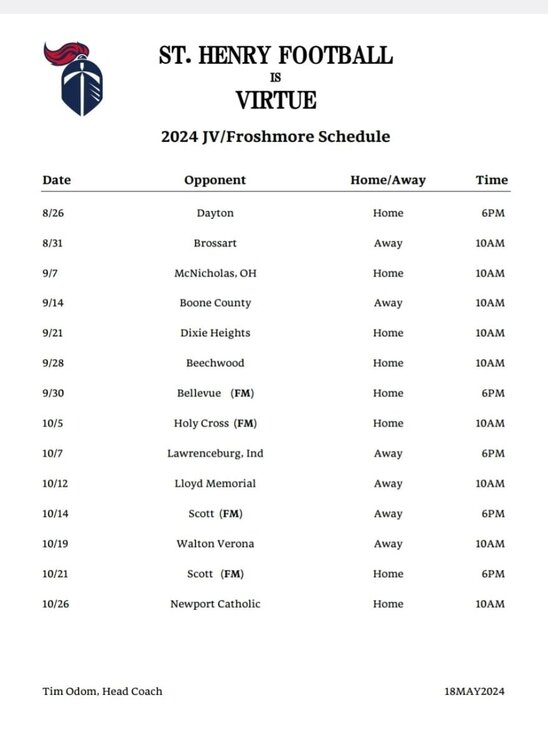
St Henry plays Dixie Heights - Freshman game, August 28th at 7:00pm. Game is scheduled at St Henry.
-
Freshman Colonels played Anderson. Anderson scored 3 times, Dixie 2 times.
-
42-0 3rd
-
35-0 Half
-
35-0 2nd
-
28-0 2nd
-
21-0 2:46 1st
-
7:09 1st DH 14 WH 0
-
11:19 left in the 1st DH 7 WH 0
-
Not at Dixie. Game is at Western Hills.
-
The Frosh scrimmage on the 17th has been moved to the 15th at Western Hills vs Anderson.
-
The announcer, "Beechwood, where ya at" ?
-
The only automatic 1st down in high school football are the roughing penalties! Roughing the snapper, holder, kicker, quarterback. All other fouls you must get the line to gain in order to be a first down!
-
-
Heard the same thing about 30 minutes ago.