

Tigerpride94
Membership
-
Joined
-
Last visited
Everything posted by Tigerpride94
-
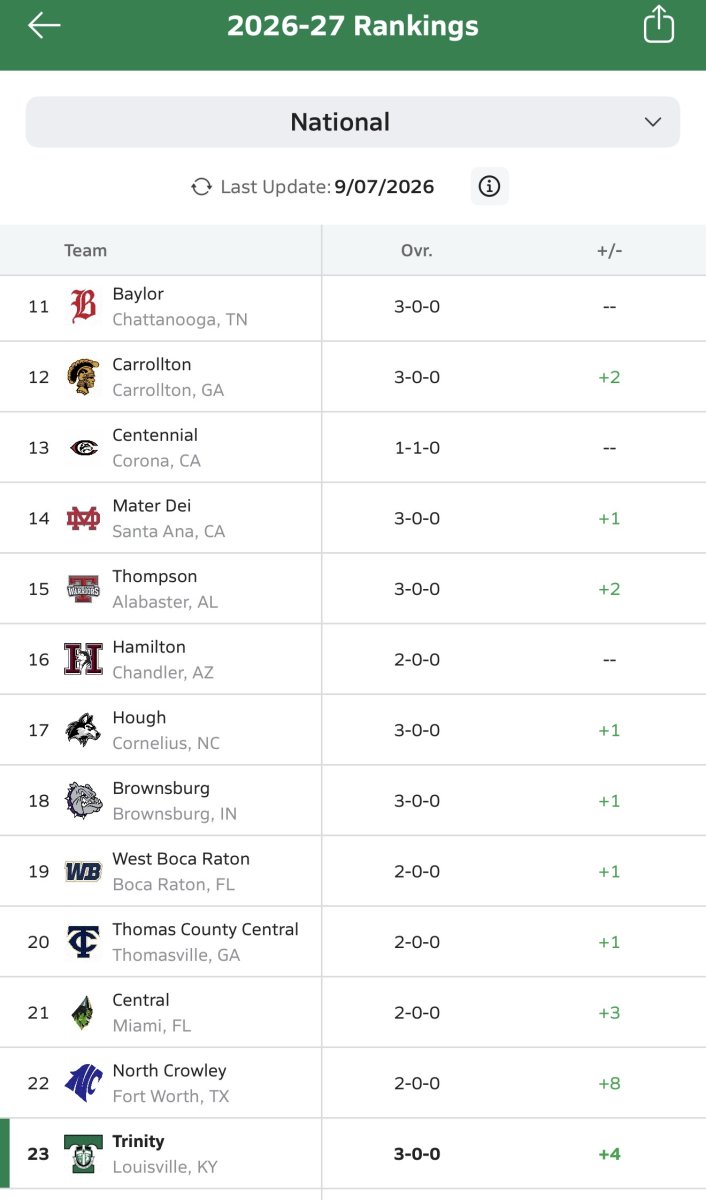
Maxpreps has Baylor #11 in the Nation and Trinity #23.
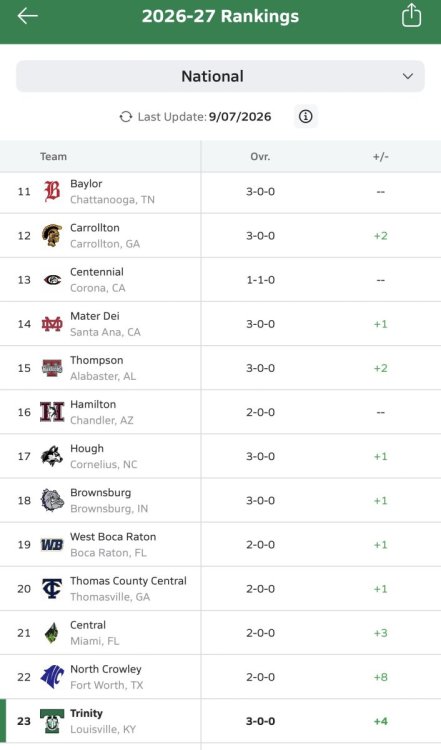 CAL got a 1st place vote. I'm curious if Baylor beats Trinity does CAL move into #1?I would have Owensboro at #1. Beating St. X is better than Scott County's win over Bowling Green plus CAL would beat Scott County just as bad as they beat Owensboro.All the major computer ratings have Simon Kenton #12 or 13. Seems all objective evidence says right now SK is not a top 10 team. Maybe that changes if they play well going forward.I think Frederick Douglass should be right where they are at #2.Should get a good read on how good the cats are under Will Stein after playing Alabama.If Ole Miss is a legitimate top 10 team then Cards should win the rest. Ole Miss offense is legit but that defense was not good. Will find out how good they are when they play LSU in a couple of weeks.Ole Miss 41-38. Final.FG is good.FG coming for OM.OM run. 4th and 3. Time out. :03 left.OM run. 3rd and 7 at Cards 35. :24 left.No time out.Time out.OM pass for 1st at Cards 38. :30 left.OM QB scramble. 3rd and 6. :42 left.Injury time out.OM pass incomplete. :50 4Q.OM 1st at own 40.Cards kickoff goes for touchback.Tied 38-38. 1:28 4Q.Cards kicking XP.




Account
Navigation
Search
Configure browser push notifications
Chrome (Android)
- Tap the lock icon next to the address bar.
- Tap Permissions → Notifications.
- Adjust your preference.
Chrome (Desktop)
- Click the padlock icon in the address bar.
- Select Site settings.
- Find Notifications and adjust your preference.
Safari (iOS 16.4+)
- Ensure the site is installed via Add to Home Screen.
- Open Settings App → Notifications.
- Find your app name and adjust your preference.
Safari (macOS)
- Go to Safari → Preferences.
- Click the Websites tab.
- Select Notifications in the sidebar.
- Find this website and adjust your preference.
Edge (Android)
- Tap the lock icon next to the address bar.
- Tap Permissions.
- Find Notifications and adjust your preference.
Edge (Desktop)
- Click the padlock icon in the address bar.
- Click Permissions for this site.
- Find Notifications and adjust your preference.
Firefox (Android)
- Go to Settings → Site permissions.
- Tap Notifications.
- Find this site in the list and adjust your preference.
Firefox (Desktop)
- Open Firefox Settings.
- Search for Notifications.
- Find this site in the list and adjust your preference.