Keep Shooting
Former Member
-
Joined
-
Last visited
-
NKY nearly swept it last year with HC.
-
I understand coaches may want their better players to reach their “average” and have all players score, but during that 62-2 half, have those players play with some bench players that will get them involved in game play at a better level. Mix it up more than take your starters running circles around the other team.
-
Wow, I hope someone that was at the game provides more details.
-
Dixie wins the 34th in PK’s
-
I’m am going with St. Henry making a return to the finals.
-
Congratulations Ella!
-
Congratulations Noelle!
-
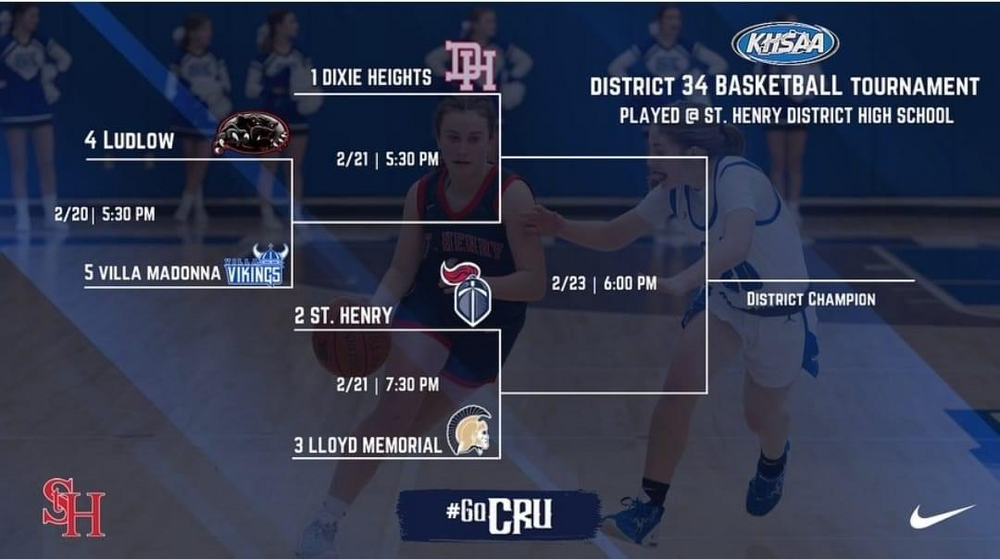
Here is the 34th district dates/times.
-
Everyone played for both teams making it a team win for SHDHS and Newport had only 7 ladies playing.
-
The Lady Cru come home with 2 wins on the road tonight against Great Crossing. Great Crossing acknowledged Raegan Barrett for 1,000 points and St. Henry had Kayla Unkraut pass 1,500. Congratulations to both players on this achievement.
-
A win Friday night would give St. Henry the 2 seed. A win would make them 3-1 in district play and Lloyd would be 2-2. It was competitive tonight, but St. Henry ended up with the win tonight.
-
I am going to say Coach Arlinghaus. He had work to get all the girls on same page with new add-ins, but he really was able to get them to gel together and it showed in the All A tournament.
-
Will anyone be providing updates on this big district game?
-
I want to know if what I heard was correct, does the female ref in this game coach AAU with the female HC coach?
-
Grant won the FROSH game by 3 and the CRU won the JV game by 3. All 3 games were competitive for these teams.