
halfback20
Suspended
-
Joined
-
Last visited
Everything posted by halfback20
-
I think you would be able to see that if you checked tracking. They updated mine to delivered within an hour of when they actually delivered. Might have been sooner than that.
-
In the original email telling me it had been shipped it had an option to presign. Mine came through UPS is yours too?Which phone do you have? My wife has the 4 and the update didn't add the 3D feature. Here is a picture without 3D of NYC. And here is one with the 3D on
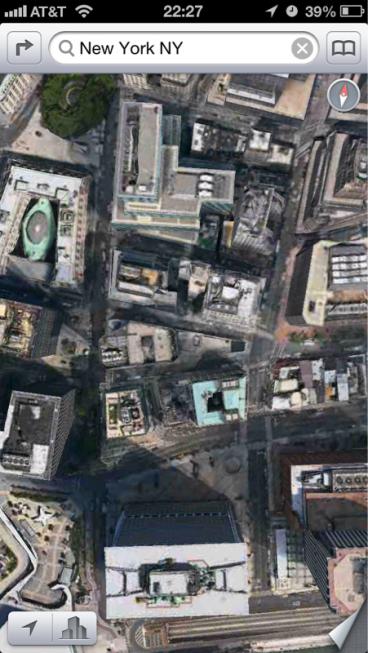
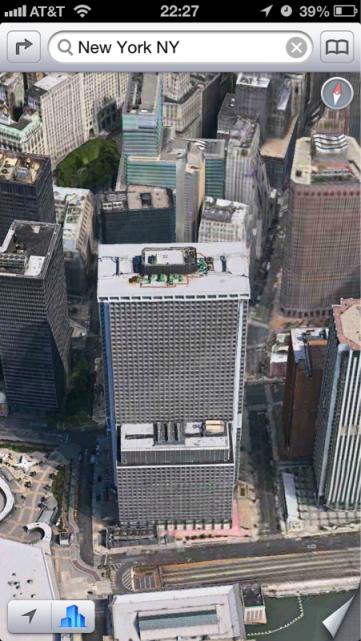 You can download YouTube.Eh the maps can be fixed. I like the new 3D feature.So, now that the 5 has been out a few days. What good new apps are out there?Oh and I love my new phone. It's everything I thought it would be. Faster, bigger, etc.Make sure you backup your old phone with iTunes or iCloud. Also make sure you download iOS 6 on it too. Then just plug the new phone in your computer and start the set up on your phone. When it asks, make sure you select to choose from iTunes backup or iCloud backup and it should basically be your old phone on your new phone.:lol: Probably our tax dollars at work.Playing on mine now. It's super fast on wifi. Any of you got a case yet? I just got an OtterBox testing it out nowYeah I don't like having that on. People I work with are nosey and don't need to be all up in my business. :lol: I got mine today but haven't had time to do anything with it other than look at it. The main thing I've noticed is how light it is. It feels like holding a phone that doesn't have a battery.Most of the updates are for 4s and up I think.My friends and my wife agree with you. :lol: I got notification from apple that mine has shipped. Looks like mine will be here tomorrow by 430 pm.Does it respond with a text?Did you click store cards?Try your new Siri and find out. :lol:Not really sure. I googled it and didn't see credit cards.Who knows. Imagine how fast the 5 is going to be.Got mine through Apple and it is an AT&T phone.That SUCKS!Mine is in Louisville now. RomanEmpire, if you aren't already aware you can track your shipment on the UPS website. Go to ups.com. Go to track by reference number, enter your billing phone number in the reference section and then in the drop down menu select United States. It worked for me.

Account
Navigation
Search
Configure browser push notifications
Chrome (Android)
- Tap the lock icon next to the address bar.
- Tap Permissions → Notifications.
- Adjust your preference.
Chrome (Desktop)
- Click the padlock icon in the address bar.
- Select Site settings.
- Find Notifications and adjust your preference.
Safari (iOS 16.4+)
- Ensure the site is installed via Add to Home Screen.
- Open Settings App → Notifications.
- Find your app name and adjust your preference.
Safari (macOS)
- Go to Safari → Preferences.
- Click the Websites tab.
- Select Notifications in the sidebar.
- Find this website and adjust your preference.
Edge (Android)
- Tap the lock icon next to the address bar.
- Tap Permissions.
- Find Notifications and adjust your preference.
Edge (Desktop)
- Click the padlock icon in the address bar.
- Click Permissions for this site.
- Find Notifications and adjust your preference.
Firefox (Android)
- Go to Settings → Site permissions.
- Tap Notifications.
- Find this site in the list and adjust your preference.
Firefox (Desktop)
- Open Firefox Settings.
- Search for Notifications.
- Find this site in the list and adjust your preference.