Skip to content
View in the app

A better way to browse. Learn more.

BluegrassPreps.com

A full-screen app on your home screen with push notifications, badges and more.

To install this app on iOS and iPadOS
  1. Tap the Share icon in Safari
  2. Scroll the menu and tap Add to Home Screen.
  3. Tap Add in the top-right corner.
To install this app on Android
  1. Tap the 3-dot menu (⋮) in the top-right corner of the browser.
  2. Tap Add to Home screen or Install app.
  3. Confirm by tapping Install.

Letsball

Suspended
  • Joined

  • Last visited

Everything posted by Letsball

  1. There was a remark on here about Joe Danneman by @Colonels_Wear_Blue The screenshot was sent to my friend in a text. Joe was contacted & verified in text that it was all made up. The extent of the in depth lying is sickening. What was the reasoning to do that?
  2. In life when people say things that aren’t true. Close supporters of that family feel inspired to correct things & you think they are the bad guys. It happens all the time in life. I’m confused you act like this is something new. This community is small.
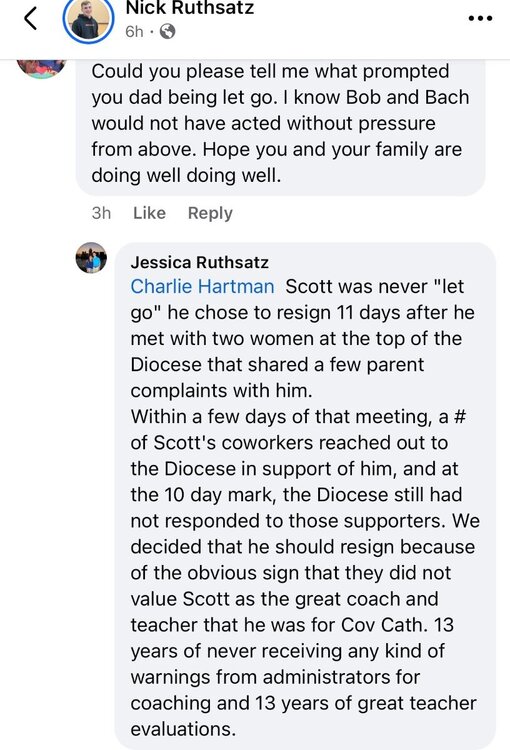
  3. Response from Scott’s wife for all those alluding to him being forced out or any excuse outside of him personally resigning.
  4. Any stats on this one?

Account

Navigation

Search

Search

Configure browser push notifications

Chrome (Android)
  1. Tap the lock icon next to the address bar.
  2. Tap Permissions → Notifications.
  3. Adjust your preference.
Chrome (Desktop)
  1. Click the padlock icon in the address bar.
  2. Select Site settings.
  3. Find Notifications and adjust your preference.

